






One of our staff members has had their bike stolen from outside of Fulford Surgery today. We are so disappointed and sad to see that someone has taken the time and effort to steal from NHS staff. We have reported this to the police and hope the bike is returned in good order.
Online Patient Services
 prioryCARE
The prioryCARE form, available Monday to Friday 8am - 6pm, uses the Klinik total triage tool which does much more than just allow you to input a request for an appointment. You can also; ask for test results, extend a fit (sick) note, let us know you are a military veteran or send us a query regarding your medication. You can read more about this on our appointments page.
If you have a new or changing medical problem, the system will take you through a series of questions about your symptoms. We aim to action urgent queries within 1 working day and routine queries within 4-6 weeks. This system does not guarantee a face to face appointment, but each new query will be assessed by a clinician and they will act on them depending on the clinical need. This may mean we arrange a telephone consultation, send you a text with advice or book you a face to face consultation at your local surgery.
If you are unsure how to use this new online system, Dr Abbie Brooks has done a series of YouTube videos talking you through the process, available here https://www.youtube.com/channel/UCjJ7XlBf7VU3Su6Lh0bE07w
The NHS App
Owned and run by the NHS, the NHS App is the simple and secure way to access a range of NHS services on your smartphone or tablet. You can request repeat prescriptions, change your nominated pharmacy, view a Covid Pass and much more. We recommend you keep notifications on so you can see if a message has been sent.
SystmOnline
You can request repeat prescriptions, access some pre-bookable appointments (e.g. BP check, smear test) and review your medical record.
To register:
- Patient Care Navigators (previously known as Receptionists) at all of our surgeries can set you up to access our on-line services. You will need to bring some photographic ID into the surgery (Passport or Driving Licence) to confirm your identity
- They will register you on the system and give you printed confirmation of your login details and instructions on how to use the system
- We would encourage you to change your password the first time you login to the new system to something more memorable for you. All passwords must be a minimum of 8 characters and must contain at least one number and one alphanumeric character (e.g. ‘!’ or ‘?’). Please allow one hour from registration before attempting to logon to our on-line services.
Example Login Screen
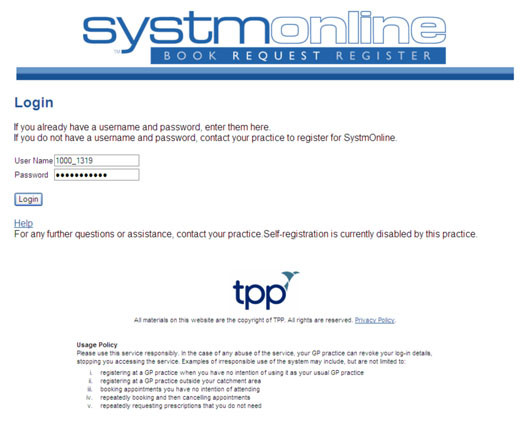
Click here to view Priory Medical Group’s statement of intent for online services
